Service alerts for the Block Island Ferry
- Client
- Block Island Ferry (through McGuinness Media & Marketing)
- Role
- Developer
- Dates
- 2026
- Stack
- WordPress, ACF, PHP, Twilio, Action Scheduler, Make
Office staff post a service alert from one screen and choose where else it goes: Facebook and Instagram, X, and text messages to about 4,400 subscribers. Moving the texts to a custom Twilio integration cut delivery from about an hour and a half to about twenty minutes.
Staff publish an alert in WordPress. It appears on the website as a banner, in the home and schedules page boxes, and as a popup if turned on.
- Meta: WordPress sends it to Make, which posts it to Facebook, and to Instagram if the alert has an image. If a step fails, Make reports back to the alert screen.
- X: WordPress posts it through the X API. Errors come straight back to the alert screen.
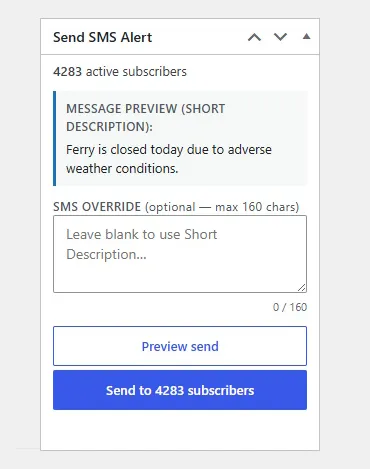
- Text messages: WordPress queues the messages in batches with Action Scheduler and sends them through Twilio. When someone replies STOP, Twilio tells WordPress, which marks them as opted out.
Posting an alert
The Block Island Ferry posts a service alert when a trip changes, most often when one is canceled on short notice. Riders need to hear about it before they get to the dock.
Before this project, the ferry’s WordPress site handled alerts with two plugins. Blog2Social shared them on social media, and WP SMS texted them to subscribers. Both plugins charged for features the ferry needed, including posting to Instagram and X in Blog2Social. The client didn’t want to pay for either upgrade, and I said I could build something more reliable.
Alerts are now a custom post type with a short and a long description. The short one appears everywhere an alert shows up: as a banner on every page, in boxes on the home and schedules pages, and in a popup that staff can turn on for the most important alerts. The alerts archive shows the full text of every active alert.
Social media and texts are handled separately, since not every alert needs to go everywhere. The alert screen has three boxes, one each for Meta, X, and text messages. Each box starts with the short description and a link to the website for more information, and staff can replace that text when a channel needs different wording. Each box also has its own send button, which unlocks once the alert is published. After a message sends, its button locks again. Sending a second time means unlocking it first, so an alert doesn’t go out twice by accident.
Posting to social media
Facebook and Instagram posts go through a Make workflow. When staff press send in the Meta box, WordPress passes the alert to Make, which posts it to both. Instagram won’t accept a post without an image, so alerts have a separate image field, and the system checks that it’s filled in before posting there. If there’s no image, the alert still goes to Facebook and skips Instagram.
Make didn’t handle the X API well, so X posts go out from WordPress directly, using a PHP library for the X API.
If a post fails, staff find out in the editor. For X, WordPress gets the error straight back from the API. For Meta, Make calls a webhook on the site when a step fails, and the alert screen shows the failure.
Moving the texts to Twilio
Apart from the cost, WP SMS had two problems. It wasn’t honoring STOP replies, so people who had opted out could still get texts. And an alert took about an hour and a half to reach every subscriber. I never found out exactly why it was that slow.
I wrote a small importer on the WordPress dashboard to move the existing subscribers over from a CSV file. New riders sign up through a form on the site, and their details are stored in WordPress. When someone replies STOP, Twilio calls a webhook on the site, which marks them as opted out.
My first version hit Twilio’s rate limit, and messages failed. To fix it, I used Action Scheduler to queue the messages and send them in batches. Action Scheduler runs on WordPress’s cron, which normally only runs when someone visits the site, so I turned on WP Engine’s Alternate Cron to run it on a fixed schedule instead. Texts now reach every subscriber in about twenty minutes, early enough that riders who are already on their way can turn around before they reach the dock.
What was still slow
The remaining limit was the ferry’s toll-free number, which sends about three messages a second. A short code sends about 100 a second, which would get an alert to every subscriber in under a minute. The application for a short code was still in progress when I left in August 2026.