Rebuilding the Block Island Ferry website
- Client
- Block Island Ferry (through McGuinness Media & Marketing)
- Role
- Technical lead and developer
- Dates
- 2025–2026
- Stack
- WordPress, PHP, Timber/Twig, ACF, Vite, TypeScript, SCSS, Shopify
The ferry's slow, out-of-date website became a custom WordPress theme on new hosting, launched in May 2026. Pages load much faster, and any office staff member can update the schedule.
Why the old site was replaced
The ferry’s old website was slow. It had been moved to a VPS that the client had no one to maintain, and its WPBakery theme had gone years without updates and was starting to show security problems. About 3,000 people visit the site on a typical day.
The schedule caused the most day-to-day trouble. Changing a single day meant creating a new post and filling in a full week, so in practice one person did all the updating.
We pitched a rebuild to the client in September 2025, and design started that December. I led the sessions that set the scope. Most of them included the agency’s accounts manager, the ferry’s media manager, and me, and ferry leadership and the ticketing service’s reps joined when their part came up. The media manager was the main person behind the website, so her opinion was the one we needed most often.
A schedule anyone in the office can edit
The new schedule is built from nested ACF fields, written in code with ACF Builder so they live in the theme’s repository with everything else. In summer the ferry runs three routes, and each one has its own settings screen. Each schedule covers a date range and holds groups of days. Days that run the same times share a group with one list of departures and returns, so a season where most days look alike only has to be entered once.
To change a single day, an editor adds another schedule for just that day and gives it a higher priority. For any date, the site shows the schedule with the highest priority, and if two are tied, the one further down the list. A weather cancellation and a holiday schedule in the middle of a season work the same way, and the regular schedule stays as it was.
I walked the ferry’s media manager through it in a Teams session, then gave her the recording and a written guide so others in the office could make updates too.
How riders see the schedule
The schedule page opens on a single day, at the client’s request. Riders can switch to a week view, where today is highlighted, or pick their travel date from a date picker. Trips to Block Island and trips back are in separate tables, each with its own heading and color.
In summer, each of the three routes has its own tab. If a route has no trips on the chosen day or week, its tab is hidden. The client felt a disabled tab might confuse riders.
A badge marks any day when the schedule changes, whether it’s a one-day override or the start of a new season. The site works this out from the schedules themselves, so staff don’t add it by hand.
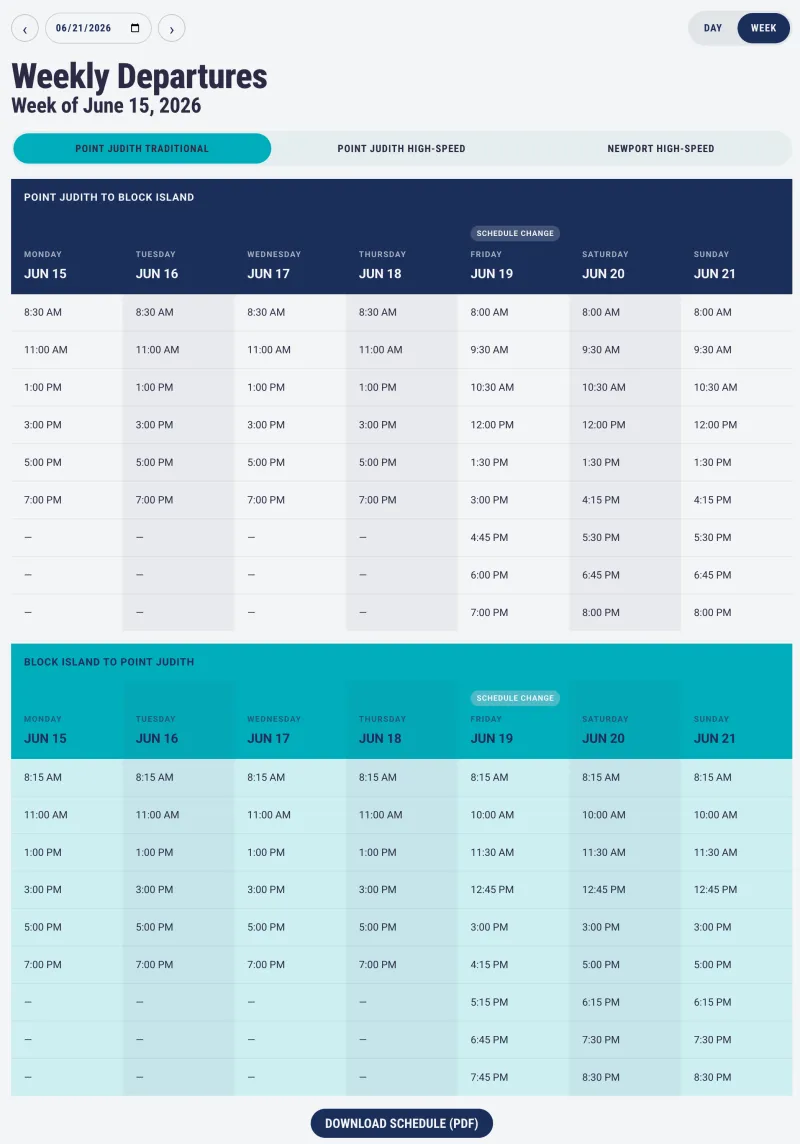
Picking a date, a route, or a view fetches the new schedule without reloading the page. All three are also kept in the page’s address, which updates as the rider clicks. The schedule still works without JavaScript, and a copied link opens to the same view.
The home page now shows the day’s departures for whichever routes are running, drawn from the same schedule screens. Thirty minutes after the last boat, it switches to the next day’s. The old home page had only a button linking to the schedules.
The display went through a few rounds with the media manager. We split the two directions a couple of different ways before settling on separate tables, and the current-day highlight and the change badge both came out of those rounds.
Reworking the design
I designed the site in Figma, and the client approved the layout. Once it was built, the media manager, ferry leadership, and a couple of office staff she asked all felt it looked dated. We spent about two weeks reworking it, and to save time, I made the changes directly in the theme instead of going back to Figma.
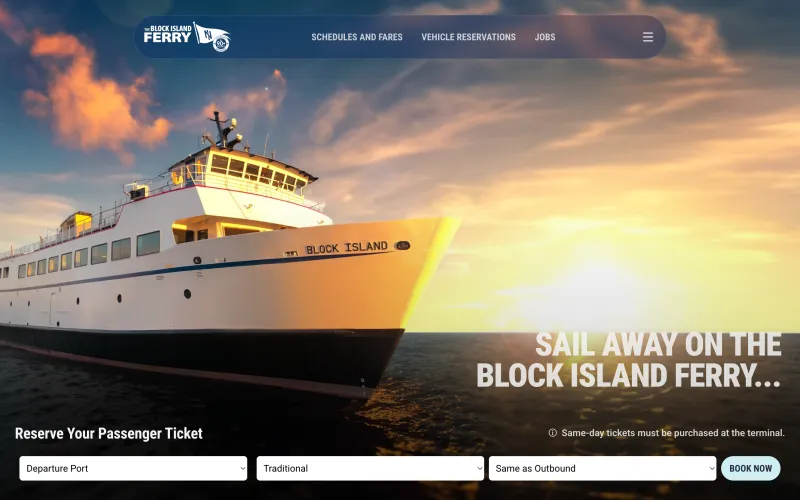
The new design has a fixed, rounded navigation bar with the three links the client considered most important: Schedules & Fares, Vehicle Reservations, and Jobs. A drawer slides out with the full site menu. Corners are rounded throughout, and buttons and links respond on hover.
The rework meant redoing some templates the agency’s junior developer had already built. A simpler project had a deadline coming up at the same time, so I moved him onto it and did the rework myself. After two more rounds of edits, the client signed off, and the site launched in mid-May instead of early April as planned.
Merchandise and tickets
The ferry sells about 30 items, from clothing to books, through Shopify buy buttons. The old site already used them, but adding a product meant pasting Shopify’s full buy-button code onto the page and editing its styles by hand.
On the new site, each product is a post with a featured image, a Shopify product ID, and a price, and staff can sort products into categories. I moved Shopify’s buy-button script into one shared TypeScript file, so it isn’t copied onto every product. When a rider adds something, Shopify’s cart slides in, and checkout happens on Shopify.
Tickets are sold through a third-party booking service. We looked at connecting it to the site through its API, but that would have meant rebuilding much of what the service already does, so the client and the agency decided together to keep booking on the service’s own site. The home page has a trip selector instead. A rider picks a departure port, the type of ferry, and a return port, and the selector sends them to the matching page on the booking site. The ferry type option disappears for Newport, which only has high-speed ferries. After launch, staff and riders told us it was easier to find the right place to book.
Building it with a junior developer
The site was built on a starter template I’d put together at the agency, with Vite, TypeScript, SCSS, and Twig templates through Timber. Each template has a controller that adds what its page needs to Timber’s context. We’d used the template on two small sites of about five pages each, but this was the first large build on it.
The junior developer had joined the agency in January 2026, and this was one of his first projects without a page builder. He built most of the page layouts and forms, along with some of the simpler content fields. He submitted his work as pull requests on GitHub, which I reviewed, and a few times I sat with him to troubleshoot or work through a more complex template. I took the more involved parts myself: the schedule logic and its AJAX loading, the Shopify setup, and the larger ACF field groups.
Some things came up on the ferry site more often than I’d expected, so they went back into the template as defaults: a base class for custom taxonomies, a separate query class for each post type, and Twig filters for phone links and for hiding email addresses from scrapers.
After launch
The site had everything we’d planned for it at launch. Load times in Lighthouse improved a lot, though I didn’t keep the old scores. At our recommendation, the site also moved to WP Engine at the same time, so I can’t say how much of that came from the theme and how much from the hosting. Staff and riders also said the schedule was much easier to read, and staff found it easier to edit.
The main work after launch was a system for service alerts, which posts each alert to the website, social media, and text subscribers.